

所谓的密铺(tessellation)是用一种或多种平面形状去填满一个更大的平面。用正六边形(regular hexagon)来密铺成网格(grid),会比用矩形密铺还来得更复杂,造成更艺术的视觉效果。那么要如何写程序来画出这个复杂的正六边形网格呢?
正六边形,有六个等长的边和六个相等的内角,每个内角都是 #{{ {(6 - 2) \times 180^\circ \over 6} = 120^\circ }}#。一个平面形状要有平面密铺的能力,其平铺后每个交接点的任意两相邻的边所形成的夹角和必须要能是 #{{360^\circ}}#,在正多边形中,只有正三边形、正四边形、正六边形能够密铺。
在绘制正六边形网格前要先会绘制正六边形,可以参考这篇文章:
接着还要了解一下正六边形各个部份的长度。
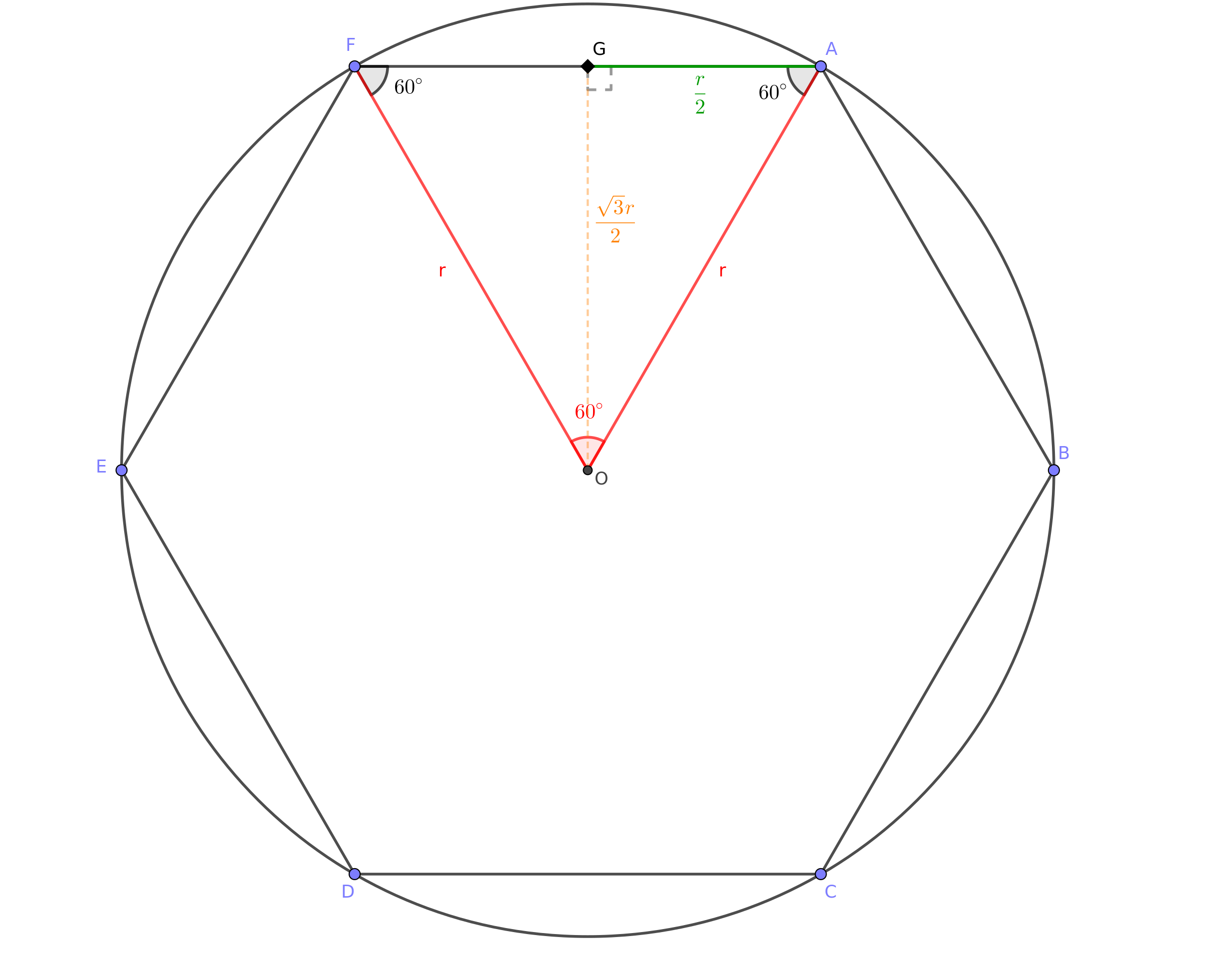
如上图,#{{ \overline{OA} }}# 是圆 #{{O}}# 的半径 #{{r}}#,即为这个六边形 #{{ABCDEF}}# 的外置圆半径(circumradius)。由于 #{{\angle{AOF} = 60^\circ}}#,且 #{{ \overline{OA} = \overline{OF} }}#,所以 #{{ \angle{FAO} = \angle{OFA} }}#,所以 #{{ \triangle{AOF} }}# 是正三角形,可以知道 #{{ \overline{FA} = \overline{OA} = r }}#。设 #{{G}}# 为 #{{ \overline{FA} }}# 的中点,则 #{{ \overline{GA} = {\overline{FA} \over 2 } = {r \over 2} }}#。#{{ \triangle{AOG} }}# 是直角三角形,根据勾股定理,直角三角形的两股长的平方和等于斜边的平方,可列出 #{{ \overline{OG}^2 = r^2 - {r^2 \over 4} = {3r^2 \over 4} }}#,所以 #{{ \overline{OG} = {\sqrt{3}r \over 2} }}#。#{{ \overline{OG} }}# 即为这个六边形 #{{ABCDEF}}# 的内切圆半径(inradius)。
再来看看正六边形密铺的样子,如下图:
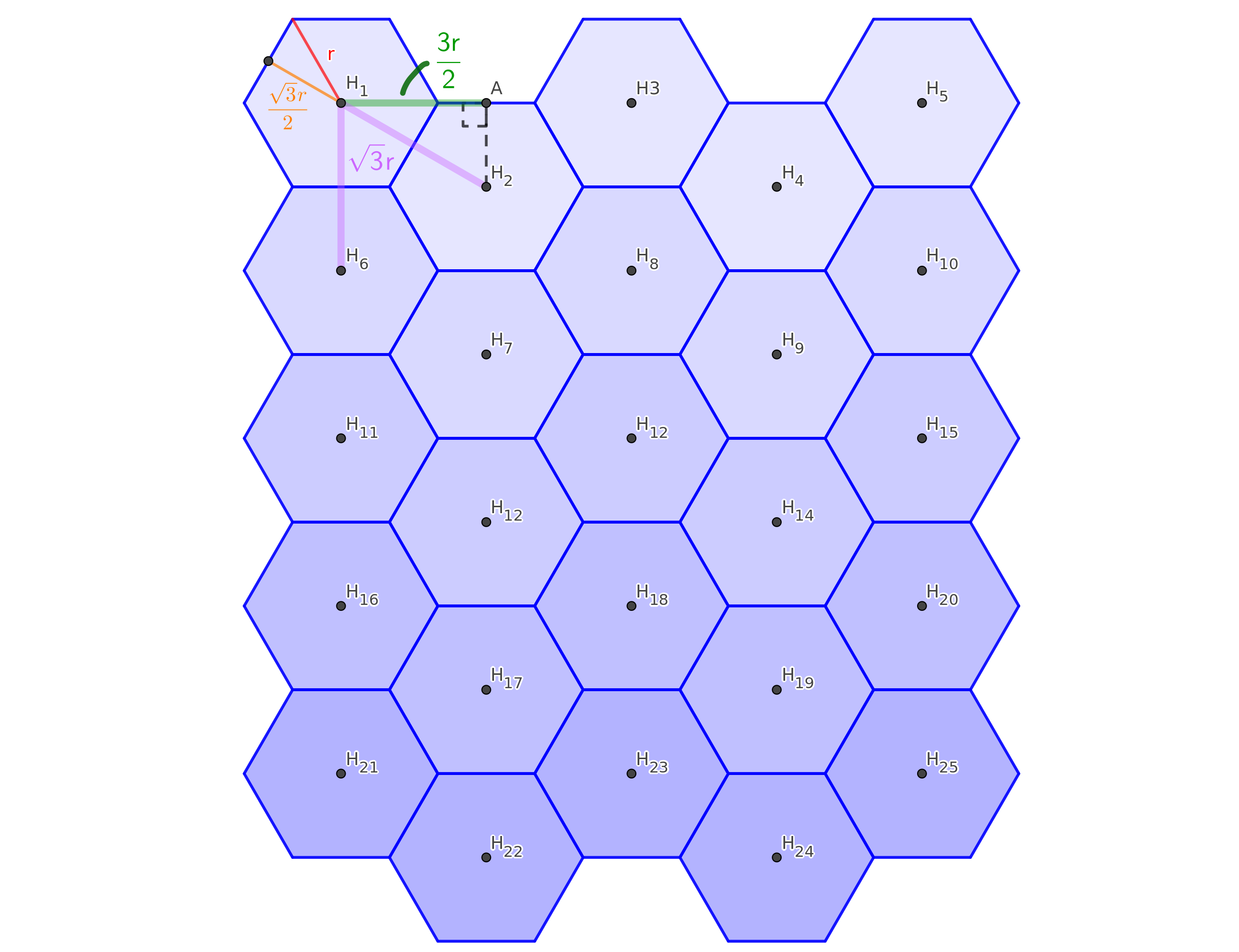
上图是一个 #{{ 5 \times 5 }}# 的正六边形网格,其中的点 #{{H_i}}# 是各个正六边形的中心,#{{i}}# 将正六边形从左到右、从上到下按顺序编号。观察后可以知道,水平相邻的正六边形,中心点相隔了 #{{ 3r \over 2 }}# 的水平距离;垂直相邻的正六边形,中心点相隔了 #{{ \sqrt{3}r }}# 的垂直距离。
掌握了这些信息后,只要去计算正六边形网格的正六边形中心点的位置,再用绘制正多边形的方法在那个位置上画出正六边形就可以绘制出正六边形网格了。
以网页浏览器上的 JavaScript 为例,可以写出如下的程序:
const canvas = document.getElementById("hexagon-grid");

const drawHexagonGrid = (width = 5, height = 5, margin = 5) => {
    if (canvas.getContext) {
        const ctx = canvas.getContext("2d");

        canvas.width = canvas.clientWidth;
        canvas.height = canvas.clientHeight;

        /*
        // clear the canvas; it might not be necessary because the size of the canvas has been re-assigned and thus the canvas should have been cleared
        ctx.clearRect(
            0,
            0,
            canvas.width,
            canvas.height,
        );
        */

        width = Math.floor(width); // ensure width is an integer
        height = Math.floor(height); // ensure height is an integer

        if (width < 1 || height < 1) {
            return;
        }

        const marginTwice = margin * 2;

        const gridMaxWidth = canvas.width - marginTwice; // = r * (3 / 2) * (width - 1)
        const gridMaxHeight = canvas.height - marginTwice; // = (sqrt(3) * r) * (height - 0.5)

        const widthDec = width - 1;
        const heightDecOneHalf = height - 0.5;

        const SQRT3 = Math.sqrt(3);

        const wr = gridMaxWidth / 1.5 / widthDec;
        const hr = gridMaxHeight / SQRT3 / heightDecOneHalf;

        const r = Math.min(wr, hr); // circumradius

        const dw = r * 1.5;
        const dh = SQRT3 * r;
        const dhHalf = dh / 2; // inradius

        const gridWidth = dw * widthDec;
        const gridHeight = dh * heightDecOneHalf;

        const ox = (canvas.width - gridWidth) / 2;
        const oy = (canvas.height - gridHeight) / 2;

        const angle = 2.0 * Math.PI / 6;
        const points = new Array(6);

        for (let i = 0;i < 6;i++) {
            const a = angle * i;

            const px = Math.cos(a) * r;
            const py = Math.sin(a) * r;

            points[i] = [px, py];
        }

        const drawLine = (centerPoint, a, b) => {
            ctx.beginPath();
            ctx.moveTo(centerPoint[0] + a[0], centerPoint[1] + a[1]);
            ctx.lineTo(centerPoint[0] + b[0], centerPoint[1] + b[1]);
            ctx.stroke();
        };

        const drawHexagon = (centerPoint) => {
            for (let i = 5;i > 0;i--) {
                drawLine(centerPoint, points[i], points[i - 1]);
            }

            drawLine(centerPoint, points[0], points[5]);
        };

        for (let h = 0;h < height;h++) {
            const y = oy + (h * dh);

            for (let w = 0;w < width;w += 2) {
                drawHexagon([ox + (w * dw), y]);
            }

            const yy = y + dhHalf;

            for (let w = 1;w < width;w += 2) {
                drawHexagon([ox + (w * dw), yy]);
            }
        }
    }
};
以上程序的 canvas 常数是 HTML 中 ID 为 hexagon-grid 的 canvas 元素。if (canvas.getContext) 是在判断网页浏览器有无支持 canvas 元素。
canvas 元素能够完全容得下 #{{ width \times height }}# 的正六边形网格。
程序第 79 到 91 行是在计算每个正六边形的中心点位置,并在那个位置绘制正六边形。
当 width 等于 1 时,以上程序会画出比较奇怪的结果。我们可以把程序修改成以下的样子:
const canvas = document.getElementById("hexagon-grid");

const drawHexagonGrid = (width = 5, height = 5, margin = 5) => {
    if (canvas.getContext) {
        const ctx = canvas.getContext("2d");

        canvas.width = canvas.clientWidth;
        canvas.height = canvas.clientHeight;

        /*
        // clear the canvas; it might not be necessary because the size of the canvas has been re-assigned and thus the canvas should have been cleared
        ctx.clearRect(
            0,
            0,
            canvas.width,
            canvas.height,
        );
        */

        const angle = 2.0 * Math.PI / 6;
        const points = new Array(6);

        const drawLine = (centerPoint, a, b) => {
            ctx.beginPath();
            ctx.moveTo(centerPoint[0] + a[0], centerPoint[1] + a[1]);
            ctx.lineTo(centerPoint[0] + b[0], centerPoint[1] + b[1]);
            ctx.stroke();
        };

        const drawHexagon = (centerPoint) => {
            for (let i = 5;i > 0;i--) {
                drawLine(centerPoint, points[i], points[i - 1]);
            }

            drawLine(centerPoint, points[0], points[5]);
        };

        const initializePoints = (r) => {
            for (let i = 0;i < 6;i++) {
                const a = angle * i;

                const px = Math.cos(a) * r;
                const py = Math.sin(a) * r;

                points[i] = [px, py];
            }
        };

        width = Math.floor(width); // ensure width is an integer
        height = Math.floor(height); // ensure height is an integer

        const marginTwice = margin * 2;

        const gridMaxWidth = canvas.width - marginTwice;
        const gridMaxHeight = canvas.height - marginTwice;

        const SQRT3 = Math.sqrt(3);

        if (width < 1 || height < 1) {
            return;
        }

        if (width === 1) {
            const wr = gridMaxWidth;
            const hr = gridMaxHeight / SQRT3 / height;

            const r = Math.min(wr, hr); // circumradius

            const dh = SQRT3 * r;
            const dhHalf = dh / 2; // inradius

            const gridWidth = r;
            const gridHeight = dh * height;

            const ox = ((canvas.width - gridWidth) / 2) + (r / 2);
            const oy = ((canvas.height - gridHeight) / 2) + dhHalf;

            initializePoints(r);

            for (let h = 0;h < height;h++) {
                drawHexagon([ox, oy + (h * dh)]);
            }

            return;
        }

        const widthDec = width - 1;
        const heightDecOneHalf = height - 0.5;

        const wr = gridMaxWidth / 1.5 / widthDec;
        const hr = gridMaxHeight / SQRT3 / heightDecOneHalf;

        const r = Math.min(wr, hr); // circumradius

        const dw = r * 1.5;
        const dh = SQRT3 * r;
        const dhHalf = dh / 2; // inradius

        const gridWidth = dw * widthDec;
        const gridHeight = dh * heightDecOneHalf;

        const ox = (canvas.width - gridWidth) / 2;
        const oy = (canvas.height - gridHeight) / 2;

        initializePoints(r);

        for (let h = 0;h < height;h++) {
            const y = oy + (h * dh);

            for (let w = 0;w < width;w += 2) {
                drawHexagon([ox + (w * dw), y]);
            }

            const yy = y + dhHalf;

            for (let w = 1;w < width;w += 2) {
                drawHexagon([ox + (w * dw), yy]);
            }
        }
    }
};