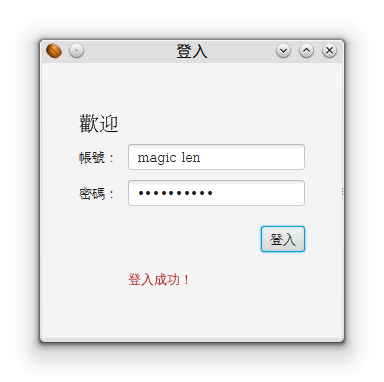

Form(表单、表格)在窗口程序或是网页中,都是很常见的显示方式。以下就以「登录表单」来作为 JavaFX Form 的练习吧!
在 Hello JavaFX 中,我们已经知道 Stage 和 Scene 的关系,也大概知道要如何制作出 JavaFX 的窗口程序。因此底下将会直接从 Scene 开始制作出我们想要的 Form。
创建登录表单
Layout(Pane)
Layout 的概念,在 Awt 的时代就有了,可以借由特殊的排版算法来对画面中的 UI 控制项进行较有弹性的排版。在 JavaFX 中,也提供了 javafx.scene.layout APIs,经典的 Border、Flow、Grid 等排版方式也都还存在。只是到了 JavaFX,Layout 有个新的名称──Pane。Layout 也可以直接作为 Scene 的 Root node。
要排出一个登录表单,Oracle 提供的作法是用 GridPane。
GUI 组件
要制作登录表单,我们需要将 Text、Label 和 TextField、PasswordField、Button 加到 GridPane 内。但在这边很奇怪的是,Text 和 Label 差别在哪呢?以继承关系来看,Text 属于 shape 底下的子类别,而 Label 属于 control 底下的子类别,这表示 Text 并不算是控制项,而是需要被 draw 出来的「形状」。在以往的 AWT 或是 Swing 中,没有提供类似 Text 的套件,所以这在 JavaFX 中算是一个新概念:Layout 中不再只能放置控制项,形状也可以被放入 Layout 进行排版!
登录事件(Event)
在按下表单上的登录按钮后,通常要运行一段验证帐号密码是否正确,然后判断是否登录成功的程序。要如何在按钮被按下后运行这段程序,就得靠 EventHandler 界面了,直接用 Lambda 语法来实作该界面即可。
撰写程序
import javafx.application.Application;
import javafx.geometry.Insets;
import javafx.geometry.Pos;
import javafx.scene.Scene;
import javafx.scene.control.Button;
import javafx.scene.control.Label;
import javafx.scene.control.PasswordField;
import javafx.scene.control.TextField;
import javafx.scene.layout.GridPane;
import javafx.scene.layout.HBox;
import javafx.scene.paint.Color;
import javafx.scene.text.Font;
import javafx.scene.text.FontWeight;
import javafx.scene.text.Text;
import javafx.stage.Stage;

public class LoginJavaFX extends Application {

    @Override
    public void start(Stage primaryStage) {
        //Layout
        GridPane grid = new GridPane(); //Grid排版
        grid.setAlignment(Pos.CENTER); //Layout置中
        grid.setHgap(10); //水平距离
        grid.setVgap(10); //垂直距离

        grid.setPadding(new Insets(25, 25, 25, 25)); //填充边界。Insets定义上、右、下、左四个方向的长度。

        //用Layout作为Scene的root node
        Scene scene = new Scene(grid, 300, 275);
        primaryStage.setScene(scene);

        //GUI组件
        Text scenetitle = new Text("欢迎");
        scenetitle.setFont(Font.font("Serif", FontWeight.NORMAL, 20));
        grid.add(scenetitle, 0, 0, 2, 1); //2,1是指这个组件要占用2格的column和1格的row

        Label userName = new Label("帐号:");
        grid.add(userName, 0, 1);

        TextField userTextField = new TextField();
        grid.add(userTextField, 1, 1);

        Label pw = new Label("密码:");
        grid.add(pw, 0, 2);

        PasswordField pwBox = new PasswordField();
        grid.add(pwBox, 1, 2);

        Button btn = new Button("登录");
        HBox hbBtn = new HBox(btn); //以新的HBox Layout来对Button进行排版,目的是为了让Button在GridPane 1,4的位置中可以靠到最右边。
        hbBtn.setAlignment(Pos.BOTTOM_RIGHT);
        grid.add(hbBtn, 1, 4);

        //登录事件
        final Text actiontarget = new Text(); //显示结果的Text
        grid.add(actiontarget, 1, 6);
        btn.setOnAction(e -> { //用lambda语法省略实作EventHandler界面
            actiontarget.setFill(Color.FIREBRICK);
            actiontarget.setText("登录成功!");
        });

        //显示Stage
        primaryStage.setTitle("登录");
        primaryStage.show();
    }
}
运行结果: